SOFTWARE
Fast Mouse Menu
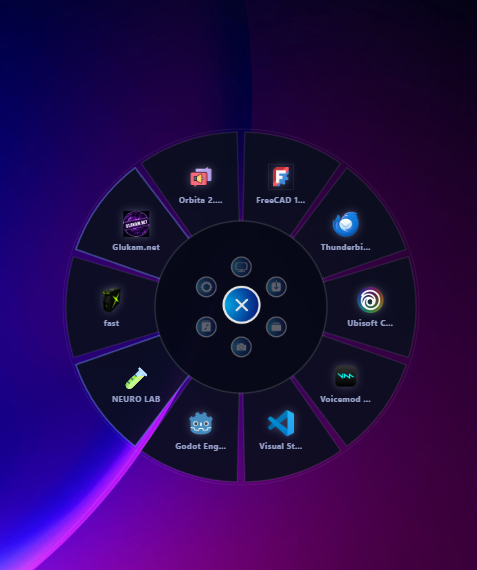
This is a system-wide universal launcher that can be summoned instantly from any screen or application via a predefined hotkey
WHAT IT DOES
01
Global Accessibility (Anywhere, Anytime)
The menu operates at the system level, overriding all other windows.
It can be triggered while working in a browser, coding in an IDE, gaming, or managing documents, eliminating the need to minimize applications or navigate to the desktop.
02
Fully Customizable "Wheel" Content
Users are free to populate the menu with virtually any type of object. Based on your setup, it includes:
Application Shortcuts – Direct launches for installed software (e.g., Visual Studio, FreeCAD 1.0, Godot Engine, Thunderbird, Ubisoft Connect).
Folder Directories – Instant access to critical file paths (e.g., Documents [2], Документы, and categorized folders like [1] and [10]).
Web Links (URLs) – Quick opening of frequently visited sites directly
Executable Commands – Custom system commands, scripts, or arguments (e.g., the fast item could trigger a performance mode, batch script, or specific app launcher).
03
Smart Categorization & Organization
The menu supports logical grouping. The brackets in your list (e.g., [2] Документы, [1], [10]) suggest that items can be organized into numbered groups, sub-folders, or nested wheels.
This allows users to separate work tools (Dev/Design), entertainment (Gaming/Media), and system utilities, keeping the wheel clean and intuitive.
04
Drag-and-Drop Management
Adding, removing, or rearranging items is seamless—users can simply drag & drop new shortcuts, files, or URLs directly into the wheel interface without diving into complex configuration files.
SCREENSHOTS
ABOUT
This is a system-wide universal launcher that can be summoned instantly from any screen or application via a predefined hotkey (e.g., mouse gesture, middle-click, or keyboard shortcut). It appears as a floating, compact panel at the current cursor position, providing lightning-fast access to your most essential digital resources without cluttering the desktop.